- Your cart is empty
- Continue Shopping


Blog
Laptop Maintenance in Egypt — The Ultimate Guide to Keeping Your Device Fast, Reliable & Long-Lasting
-
By Sohaib Salama
- Posted on
- 0 comments
Introduction — Why Laptop Maintenance Matters in Egypt
In Egypt’s climate—where dust, heat, and humidity are everyday realities—laptops are under constant stress. Whether you rely on your laptop for work, study, design, or running your WooCommerce shop, consistent maintenance is essential to keep it running at peak performance, prevent unexpected breakdowns, and save money on expensive repairs over time.
Click Here To Show Our Laptops
In this guide, we’ll cover all aspects of laptop maintenance in Egypt—from daily care tips you can do at home to professional maintenance practices that protect your device from common hardware and performance issues. We’ve also included internal link opportunities you can use to improve SEO on your website.
What Is Laptop Maintenance?
Laptop maintenance means more than just cleaning the keyboard. It involves both hardware and software care aimed at:
- Improving performance
- Enhancing cooling efficiency
- Preventing breakdowns
- Extending battery life
- Avoiding data loss
Just like regular servicing keeps a car running smoothly, regular maintenance ensures your laptop remains dependable and efficient. Simple steps like removing dust, updating software, and checking battery health can save you from big problems later.
Top Signs Your Laptop Needs Maintenance
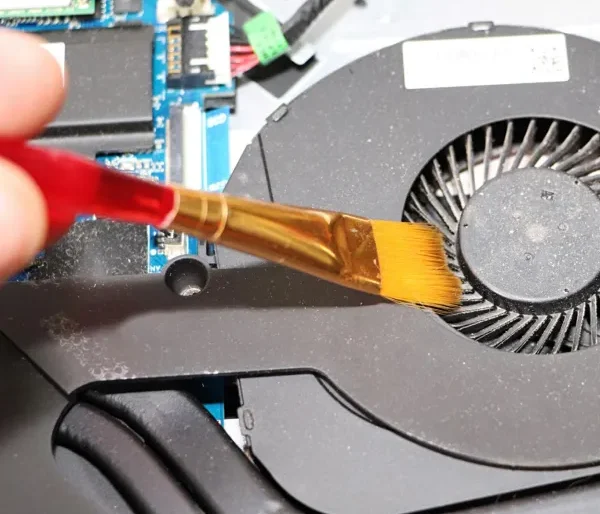
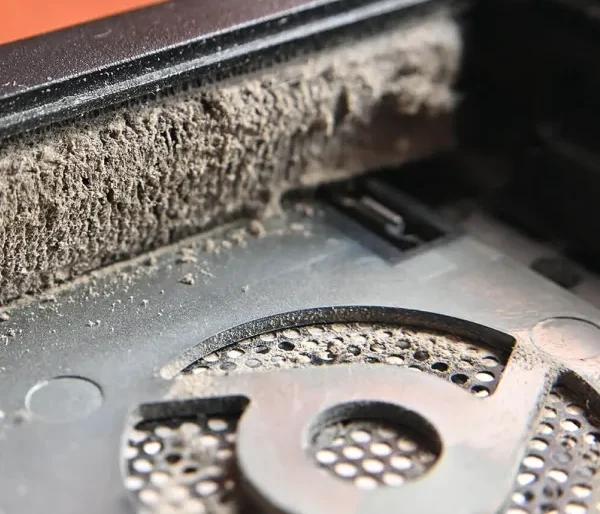
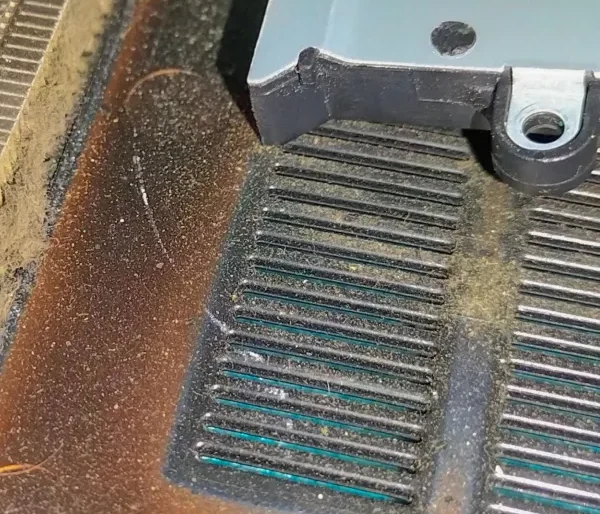
Here are the most common issues that indicate your laptop needs immediate attention:
1. Overheating & Noise
If your laptop runs hot or the fan is loud, airflow may be blocked by dust. Excess heat can damage internal parts.
2. Slow Startup & Performance
Cluttered storage, unused apps, and temporary files make your laptop slower over time.
3. Battery Drains Quickly
Reduced battery life or sudden shutdowns are signs your battery may need inspection or replacement.
4. Dust or Dirt Visible in Vents
Dust buildup is a silent performance killer that restricts airflow and causes thermal strain.
5. Keyboard or Trackpad Issues
Sticky or unresponsive keys not only affect typing but can lead to more serious hardware problems.
Ultimate Laptop Maintenance Checklist
Here’s a complete maintenance routine you should follow regularly:
🛠 Hardware Maintenance
- Clean Vents and Fans: Blocked vents raise internal temperatures and reduce performance.
- Remove Internal Dust: Dust accumulates inside and can damage chips or circuits.
- Inspect the Battery & Power Connector: Loose power connections often cause charging issues.
- Check Screen and Hinges: Loose hinges or screen frames can cause display problems.
🧹 Software Maintenance
Uninstall Unused Programs
Free up storage space and improve speed.Disk Cleanup & Remove Temporary Files
Accelerate performance and make room for essential files.Update Your Operating System & Drivers
Keep your system secure and running smoothly.Run Antivirus & Security Scans
Regular scans prevent malware and reduce slowdowns.
These steps form the foundation of laptop maintenance in Egypt and should be performed monthly or quarterly depending on usage.
Daily Care Tips for Your Laptop
Even simple habits can drastically improve your laptop’s lifespan:
✅ Always keep your laptop on a flat, stable surface to ensure airflow isn’t blocked.
✅ Avoid eating or drinking near your laptop to prevent spills or crumbs inside the keyboard.
✅ Carry your laptop in a protective bag when moving around.
✅ Use a cooling pad during long work sessions or heavy tasks.
Laptop Maintenance & Software Optimization
Maintaining hardware is only half the process—software performance matters too:
Clean Startup Programs
Too many apps launching on startup slow down boot time and drain memory.
Remove Unnecessary Files
Delete downloads, old installations, and other clutter to free space and keep things running smoothly.
Manage Updates
Install updates regularly to benefit from performance improvements and security fixes.
These steps help your laptop respond faster and perform better under pressure.
Professional Laptop Maintenance Services You Should Offer
If you provide maintenance services, your customers are looking for solutions including:
- Full internal dust removal
- Fan cleaning & cooling optimization
- Battery health testing & replacement
- Thermal paste reapplication
- Screen and keyboard check
- Storage upgrades (SSD/RAM)
- Software optimization and virus removal
Offering comprehensive services and clear pricing on your site increases trust and conversions.
Why Maintenance Saves You Money in the Long Run
A laptop that is cleaned, secured, and optimized regularly avoids:
- Unexpected hardware failures
- Data loss and recovery costs
- Frequent slowdowns
- Shortened battery life
In fact, according to many tech experts, regular laptop maintenance can extend lifespan by years and prevent many common problems that lead users to seek costly repairs.
Conclusion — Keep Your Laptop Running Like New
Laptop maintenance in Egypt isn’t just a service — it’s a necessity. With dusty environments and constant use, laptops suffer without routine care. Following the steps in this guide helps you:
- Protect your investment
- Improve system
- performance
- Avoid breakdowns
- Save money on repairs
- Extend device lifespan
For anyone depending on their laptop — whether for business, design, or education — proper maintenance ensures reliability and performance you can count on.
Ready to Take Your Laptop Maintenance to the Next Level?
Make sure your laptop gets professional care today. Contact us through our website or book an appointment using our online service form.
Let’s keep your laptop fast, safe, and long-lasting!
